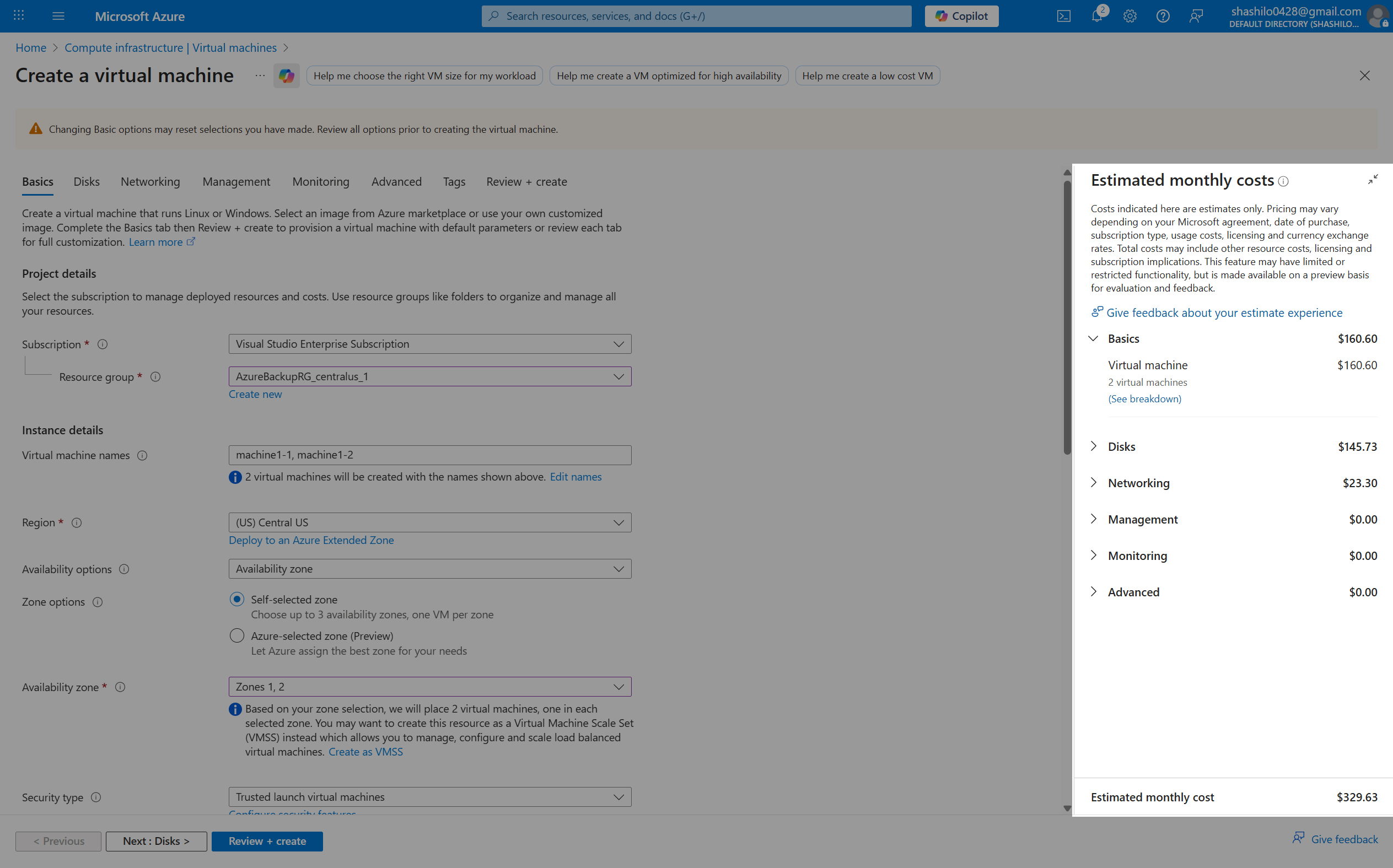
Bringing real-time pricing transparency to the Azure Portal allowing customers to know exactly what they'll pay before they commit.
A pricing widget that has become the standard to drive measurable business impact and delight millions of cloud customers.
Visit Azure Portal
Users were flying blind on pricing—and it was costing us customers.
Imagine you're a cloud architect spinning up a new virtual machine for a production workload. You carefully select your instance type, configure storage, choose a region—making dozens of micro-decisions that each affect your monthly bill. But here's the catch: you won't see a single dollar amount until you click "Create" at the very end.
This was the reality for millions of Azure customers. The pricing information existed in the system, but it was hidden away like a secret, revealed only at the moment of truth. Customers resorted to opening the Azure Pricing Calculator in a separate tab, manually entering their configurations, and hoping the numbers would match. Spoiler: they often didn't.
Customers spent 10-15 minutes configuring a Virtual Machine only to discover at checkout that it cost 3x their budget. The late reveal created sticker shock, leading to abandoned carts and frustrated users who felt misled—even though we never intended to hide anything.
Power users developed a workaround: opening the Azure Pricing Calculator in another browser tab and manually mirroring their Portal configuration. But these tools weren't connected, creating drift, errors, and a fragmented experience that felt distinctly un-Azure.
Our on-call engineers were drowning in tickets about pricing discrepancies. "Why was my bill $342 when the calculator said $280?" These weren't bugs—they were trust issues. Each ticket cost us engineering time and, worse, customer confidence.
Lead Frontend Engineer & UX Engineer
I architected the frontend and UX engineering for Cost Card, serving as the bridge between design vision and production reality. My responsibilities spanned the full spectrum—from collaborating with designers during early wireframing sessions, to architecting a scalable component system that could serve hundreds of Azure services.
Designed the component architecture using React, Zustand for state management, and Module Federation for seamless integration across Azure's micro-frontend ecosystem. The application is built on NX monorepo for maintainability at scale.
Partnered daily with the Pricing API team to ensure pricing data accuracy, worked with Azure Portal Virtual Machines teams on integration patterns, and collaborated with UX designers and researchers to validate design decisions with real customer data.
Ensured every pixel adhered to Fluent UI principles while pushing the boundaries of what was possible. Contributed patterns back to the design system that are now used across Azure.
Before writing a single line of code, we needed to understand the depth of the problem. I partnered with our UX research team to conduct a multi-phase research initiative that would inform every design decision.
AWS and GCP both surface pricing during configuration—though with varying degrees of accuracy and real-time responsiveness. We saw an opportunity not just to match, but to exceed: real-time updates, discount integration, and a native Azure experience.
We analyzed 6 months of provisioning funnel data, discovering that 23% of users who reached the final step abandoned without creating their Virtual Machine. Exit surveys revealed "unexpected cost" as the #1 reason—ahead of technical issues, authentication problems, or quota limits.
I sat in on 12 customer interview sessions, watching real cloud architects navigate the Virtual Machine creation flow. The frustration was palpable. One enterprise customer said, "I have to justify every dollar to my finance team. Going in blind isn't an option." That quote became our team's north star.
Context is everything. Users don't want to see pricing on a separate page or in a popup—they need it right there, updating live as they toggle options. The price should feel like a natural extension of the configuration UI.
Native breeds trust. When pricing feels like an afterthought or a third-party widget, users question its accuracy. A Fluent UI-native experience signals "this is official Azure data you can rely on."
Transparency converts. Our analytics showed that users who understood their costs upfront were 25% more likely to complete provisioning—and 30% less likely to file a support ticket within 30 days.
A living, breathing price display that updates as you configure
The Cost Card is elegantly simple in concept but technically demanding in execution. It's a persistent UI component that displays the estimated monthly cost of your Azure resource, updating in real-time as you change any configuration option—instance type, storage, region, reservation terms, anything.
Under the hood, it's powered by a debounced connection to Azure's Pricing API, optimized to feel instantaneous without hammering our backend services. It respects your organization's negotiated discounts, handles 40+ currencies and regional pricing variations, and gracefully degrades when network conditions are poor.
From user interaction to real-time price—watch the data journey.
Cached API calls with optimistic UI updates create a perception of instant feedback. Users see the price change before their finger leaves the dropdown.
Multiple currencies, regional pricing variations, and automatic locale detection. A customer in Tokyo sees Yen; a customer in Berlin sees Euros—all without changing settings.
Automatically detects and applies organizational discounts, reserved instance pricing, and Azure Hybrid Benefit. The price you see is the price you'll pay.
Built from the ground up with Fluent UI components and tokens. Supports light/dark themes, high contrast mode, and meets WCAG 2.1 AA accessibility standards.
Other Azure services can integrate Cost Card with just a few lines of code. The component handles all complexity—API calls, caching, error states, and formatting.
Ability to maintain functionality and performance even during network issues or API outages, ensuring a seamless user experience.
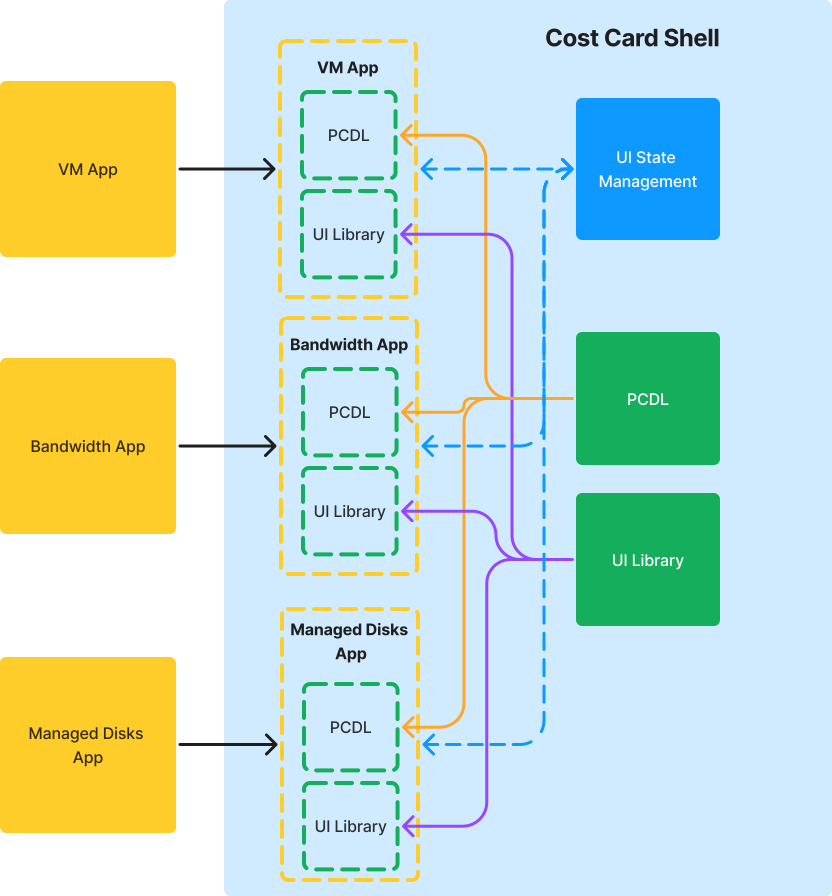
How Cost Card fits into Azure's micro-frontend ecosystem and component structure.
Cost Card leverages Module Federation to seamlessly integrate across 150+ Azure services without requiring each team to bundle the component locally. This allows my team to be the platform to create features, utilities, and components to be consumed by other service apps.
By having reusable features, the service teams are tasked to own less of a full app and more of the business logic. Previously, we were the bottleneck because we owned the entire codebase. Any logic that needed to be updated, we'd have to do it ourselves.
This frees up each service team to own their business logic, build and deploy independently, while consuming the benefits from the platform.
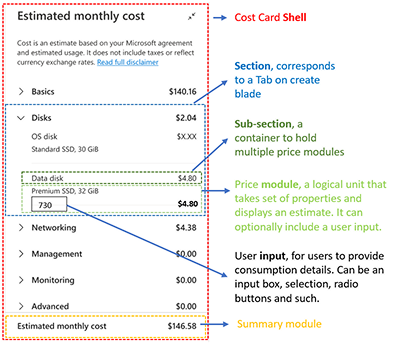
Built with Atomic Design principles—from primitive tokens to composed organisms—ensuring consistency and flexibility for adopting teams.
Creating names for custom components made it clear when we discussed them in meetings. This also played a role in the naming convention for the components, establishing a shared vocabulary across design and engineering.
Our design process wasn't a waterfall—it was a tight, iterative loop where design and engineering worked in lockstep. I was embedded in design critiques from week one, and designers joined our sprint planning. The result: fewer surprises, faster iteration, and a product we all believed in.
Spent multiple weeks in collaborative sessions with design and PM teams. My role: stress-test every wireframe against technical constraints. "Can we really update this fast?" Yes—but here's how we need to architect it.
I created high-fidelity prototypes connected to real pricing APIs from day one, allowing us to validate data accuracy, update latency, and edge cases with real numbers. These were triggered by URL parameters that created feature flags in our codebase. This allowed us to test our prototype without disrupting the main application.
Phase 1: 20 internal team members using the component in their daily work. Phase 2: 15 external customers in guided user study sessions. These sessions were all recorded and analyzed for insights.
A/B tested variants of the Cost Card. Should it stay open, collapse, or auto-hide? Placement of the widget, display pricing for each line or just a total for that section, amongst other variations. Data, not opinions, guided our decisions.
The numbers exceeded every projection we made.
We launched Cost Card to 100% of Azure Virtual Machine customers in Q3 2024 after a successful slow roll out. The slow rollout was conducted to Canary first, then release to GA (General Availability) at incremental percentages until we were confident the Cost Card was at 95%+ reliable. Within 30 days, the impact was undeniable—and the data told a story of transformed user experience and real business value.
More users completing Virtual Machine provisioning with confidence
Fewer users leaving during provisioning due to pricing confusion
Dramatic reduction in pricing-related support tickets
Achieved at launch with zero downtime
"Cost Card transformed how our customers experience Azure. It's not just a pricing widget—it's a trust signal that says 'we respect your budget.'"— Senior PM, Azure Core Platform
Every project teaches you something. Cost Card reinforced principles I'll carry into every future role—lessons about collaboration, craft, and what it means to build for scale.
I wasn't "the engineer who builds it after design is done." I was in the room for every wireframe review, every research debrief, every stakeholder pitch. That early investment paid dividends: when we hit implementation, there were no surprises, no "can we actually do this?" moments, no late-stage redesigns.
Prototypes should be adaptable. By building with flexibility in mind, we could iterate quickly, test different approaches, and pivot based on feedback without being constrained by initial assumptions.
A component that works for one service isn't valuable. A component that 150+ services can adopt without custom work? That's transformative. I learned to think beyond "does this work?" to "will other teams want to use this?"—and to design APIs, props, and documentation accordingly.
Cost Card started as a straightforward assignment: "put pricing on the VM create page." It evolved into one of the most impactful projects of my career—a pricing widget that millions of customers interact with daily, a pattern that reshaped Azure's approach to cost transparency, and a case study in what's possible when engineering and design work as true partners.
I'm proud of the technical craft—the sub-200ms updates, the 99.9% reliability, and the Storybook component visualization. But I'm even more proud that we measurably improved how customers feel when they use Azure. That's the kind of impact I want to keep chasing.
Available for frontend engineering leadership roles where I can shape user experiences at scale.